Exam & Event Timing Scenarios
Deliver precise timing with manual triggers, scheduled starts, pause/resume, and full-screen displays. TickPace adapts to every exam room, workshop, and live session.
Ad-hoc Exam Timers
When a pop quiz or impromptu activity needs to begin right now, use the manual trigger. Define the duration, hit Start, and control the flow with pause, resume, restart, or stop for absolute precision.
Ideal for
- In-class quizzes
- Make-up exams
- Practice sessions
- Self-study blocks
- Skill assessments
- Workshop or meeting timers
- Speech and presentation timing
Why it works
- Start: begin instantly with one click.
- Pause: stop the clock exactly when needed.
- Resume: continue from the paused mark.
- Stop: end the session and reset safely.
- Restart: launch again using the current duration.
- Duration: configure hours, minutes, and seconds precisely.
- Focus mode: auto-hide near the screen edge when idle.
- Full-screen: enlarge the timer so everyone can see it.
📋 Setup checklist
- Launch TickPace: click “Add Countdown”.
- Name it: e.g., “Math Pop Quiz”.
- Start method: choose “Manual trigger”.
- End method: select “Duration”.
- Duration: enter 1 h 30 m (or any value).
- Reminder: set an early heads-up (2–5 minutes).
- Alert style: enable popup + sound.
- Save: confirm the configuration.
- Begin: tap “Start” whenever the session begins.
Pro tips
Pause on demand: great for clarifying questions mid-exam.
Resume seamlessly: continues from the exact second paused.
Restart cleanly: spin up a fresh timer with one click.
Stop instantly: end the countdown and reset for the next class.
Fine-grained duration: adjust down to the second for niche tests.
Interface preview
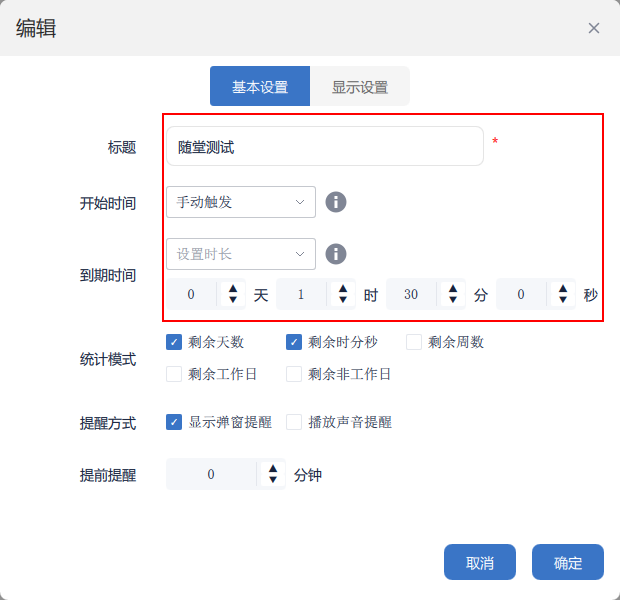
Manual trigger configuration
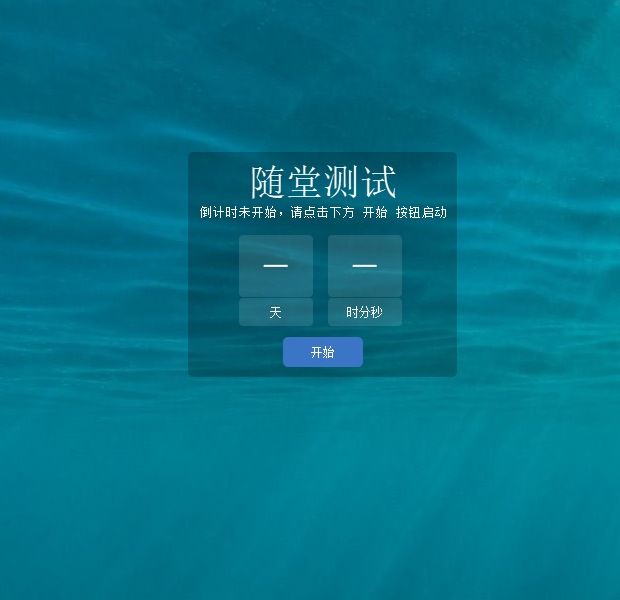
Waiting state preview
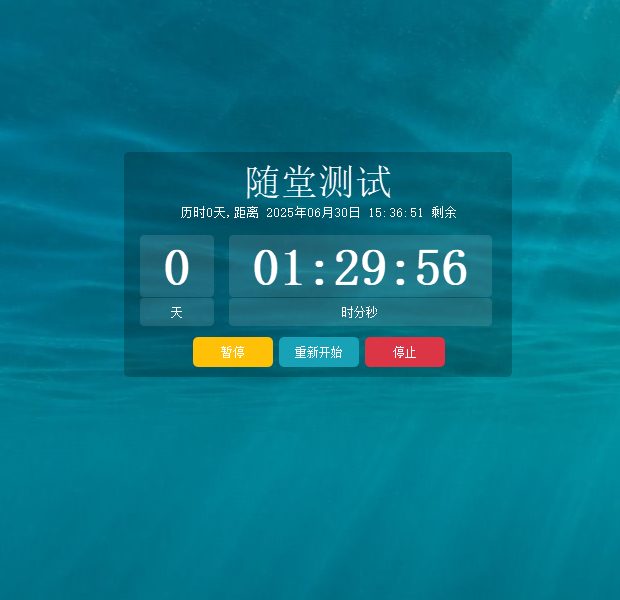
Active countdown window
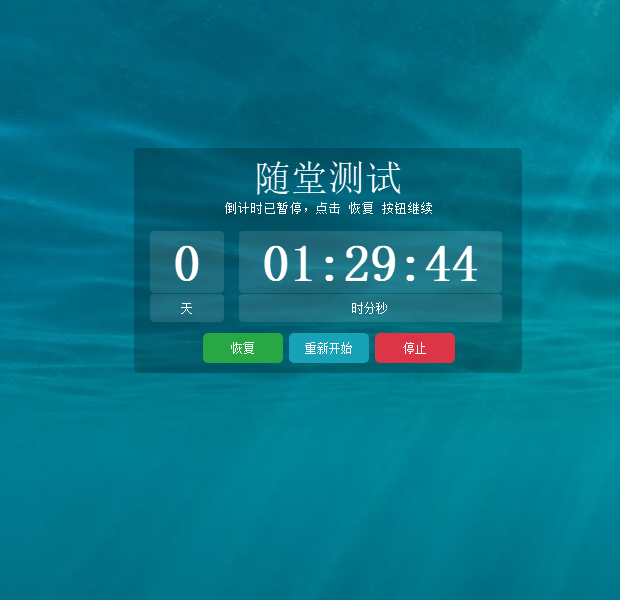
Paused view
Classroom Exam Scheduling
Coordinated exams demand precise start and end control. TickPace’s custom start time automates the countdown so proctors focus on the room, not the clock.
Ideal for
- Midterm and final exams
- Mock tests
- Class quizzes
- Standardized exams
- Academic competitions
- Graduation assessments
Why it works
- Schedule exact start timestamps (to the second).
- Automatically switches from “Waiting” to “Running”.
- Configure days in advance to avoid race-day stress.
- Manage multiple rooms or exams at once.
- Count-up mode: switch to elapsed-time tracking when needed.
- Full-screen: project the timer so every student stays aligned.
📋 Setup checklist
- Launch: open TickPace, click “Add Countdown”.
- Name: e.g., “2025 English Final”.
- Start method: select “Custom time”.
- Start time: enter 2025/06/30 09:00:00.
- End method: choose “Duration” or “End timestamp”.
- End time: set according to the exam length.
- Reminder: configure a 5–10 minute notice.
- Alert style: enable popup and sound.
- Save: confirm settings and you're ready.
Pro tips
Prep early: configure timers the day before the exam.
Heads-up: a 5–10 minute reminder helps proctors prep the room.
Desktop mode: keep the widget pinned for constant visibility.
Sound alerts: ensure the start/end cues are audible.
Duration mode: ideal for fixed-length exams with clear finish times.
Interface preview
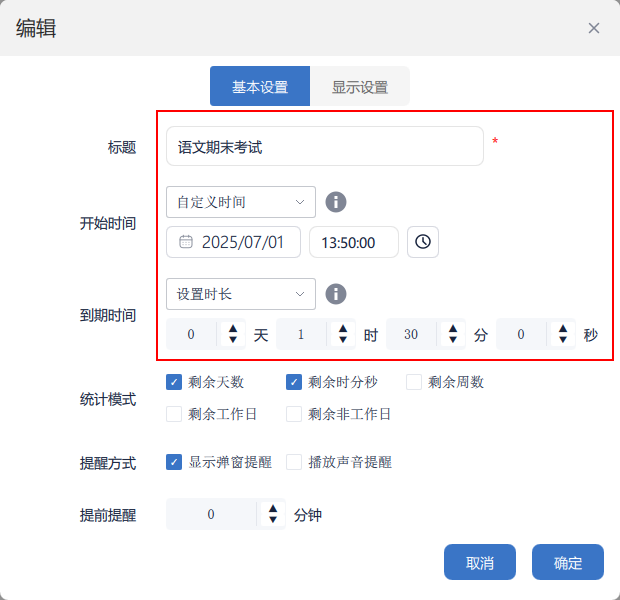
Exam configuration panel
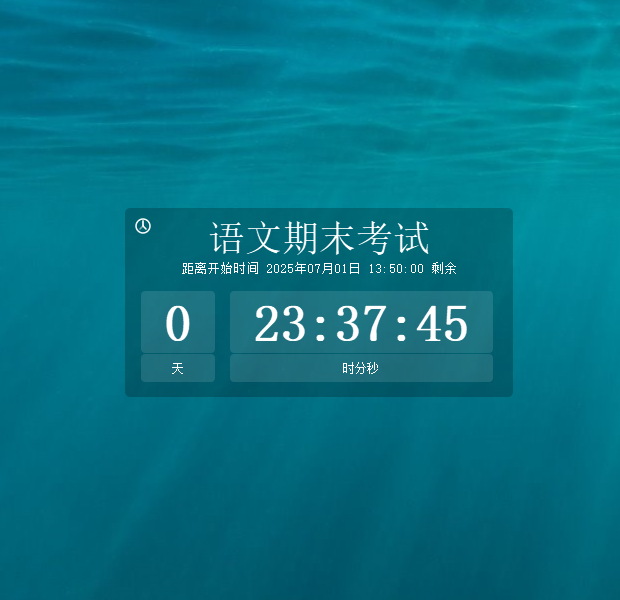
Waiting state
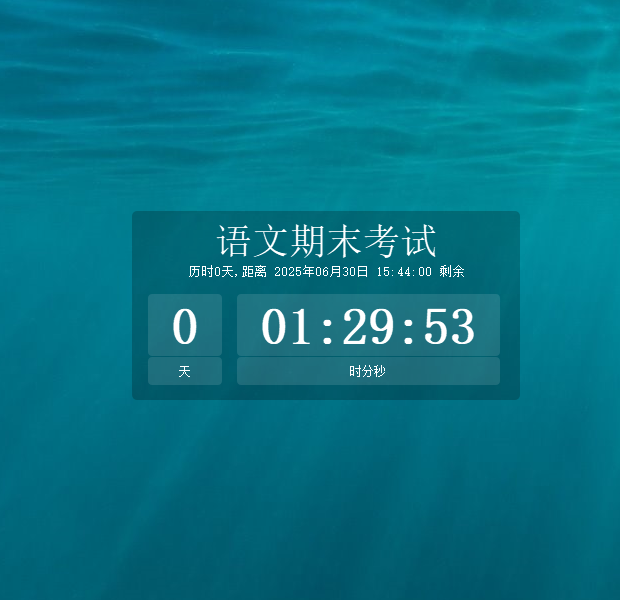
Live display
Advanced Tools
Beyond basic timers, TickPace unlocks deep customization: multiple display modes, intelligent reminders, and granular controls for any workflow.
Display Choices
Flexible views
- Days remaining: ideal for long-term goals.
- Weeks remaining: plan in sprints.
- Workdays remaining: exclude weekends.
- Non-workdays remaining: track holidays.
- Hours:Minutes:Seconds: precise exam timing.
- Combination view: mix multiple metrics.
- Full-screen: command attention in large rooms.
Control Center
Complete timer management
- Start options: manual, scheduled, or on creation.
- Pause & resume: accurate to the second.
- Restart: spin up the timer from the current values.
- Stop & reset: clear the state instantly.
- Duration control: set precise intervals.
- Status indicators: know whether it’s waiting, running, or paused.
Reminder Settings
Smart alerts
- Early reminders from 0–1440 minutes.
- Popup and audio alerts.
- Dual reminders for start and finish.
Interface Styling
Make it yours
- Font sizes from 12–500 px.
- Custom typography colors.
- Adjustable background color and transparency.
- Display layers: desktop, always-on-top, or normal.
- Drag to reposition any widget.
- Resize windows freely.
- Combine multiple display modes per timer.
Advanced tips
Multi-countdown dashboards: orchestrate complex schedules in parallel.
Template library: reuse common setups with one click.
Status management: rely on clear waiting/running/paused indicators.
Start with TickPace
Bring professional-grade timing to every exam, workshop, and milestone.