Countdowns for Every Workplace Moment
TickPace keeps teams on schedule with milestone timers, workday-only tracking, weekly cadences, and real-time desktop reminders.
Project Milestone Countdowns
Keep every deliverable visible. Set independent timers for each milestone, track remaining calendar days, workdays, and weekly progress, and keep stakeholders aligned.
Common uses
- Product launch / delivery windows
- Design or code review deadlines
- Kickoff and wrap-up markers
- Contract or bid submissions
- Client check-ins and steering updates
Highlights
- Workday countdowns: exclude weekends/holidays automatically.
- Daily velocity: show per-workday progress targets.
- Weekly view: scan the cadence at a glance.
- Parallel milestones: group by project or department.
- Alerts: popups and sounds fire as deadlines approach.
📋 Setup checklist
- Create a timer: click “Add Countdown” and name it (e.g., “Launch GA”).
- Set the deadline: choose the exact date and time.
- Pick metrics: enable remaining days, workdays, or weeks.
- Group it: assign to a project/department group for clarity.
- Reminder style: configure popups or sounds for early warnings.
Milestone interface preview
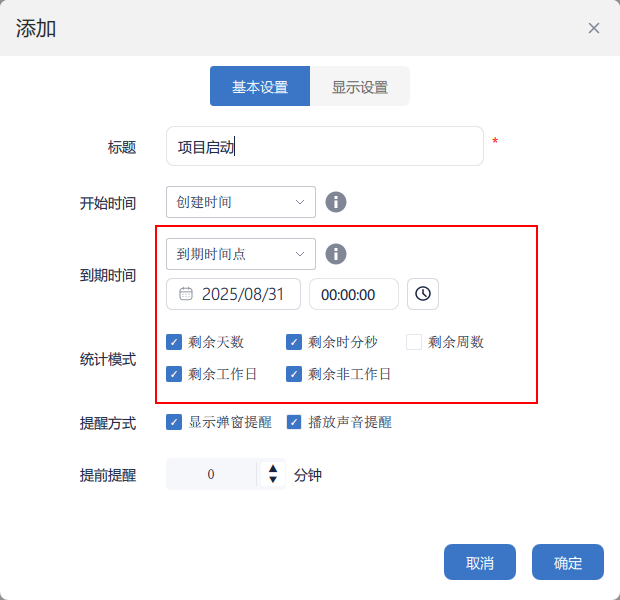
Milestone setup
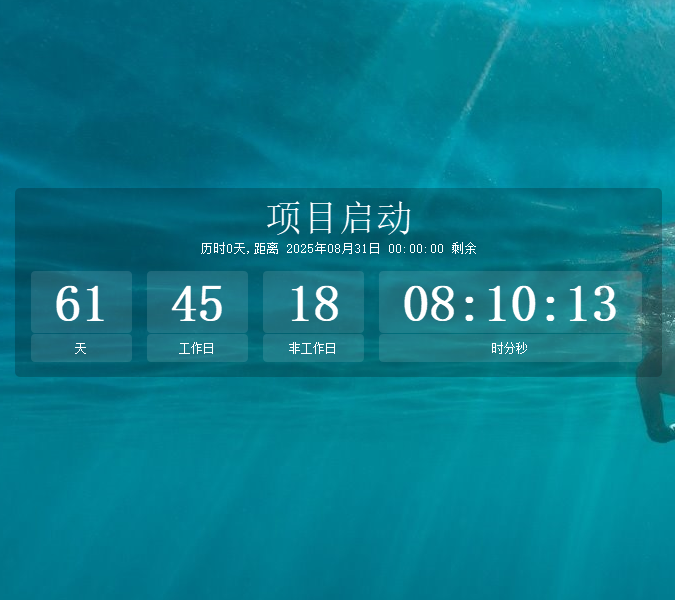
Live timer on desktop
Daily Operations & Team Rituals
Beyond milestones, TickPace keeps recurring meetings, check-ins, and deliverables on track so the entire org shares the same tempo.
Where it helps
- Weekly stand-ups or all-hands timers.
- Weekly / daily report reminders.
- Task deadlines and progress checkpoints.
- Customer follow-up or renewal alerts.
- Quarterly OKR countdowns.
Why it works
- Parallel timers: run many schedules without conflicts.
- Grouped layouts: organize by team or task type.
- Flexible alerts: choose popups, sounds, or both.
- Desktop/always-on-top: keep critical items visible.
- Custom styling: adjust colors and transparency.
Workplace timer tips
Workdays first: show remaining workdays for realistic plans.
Use groups: separate projects, departments, or clients.
Alert style: enable both popup and audio for key milestones.
Pin important timers: set desktop/always-on-top for visibility.
Tune transparency: balance readability with a clean desktop.