1. Pomodoro Basics
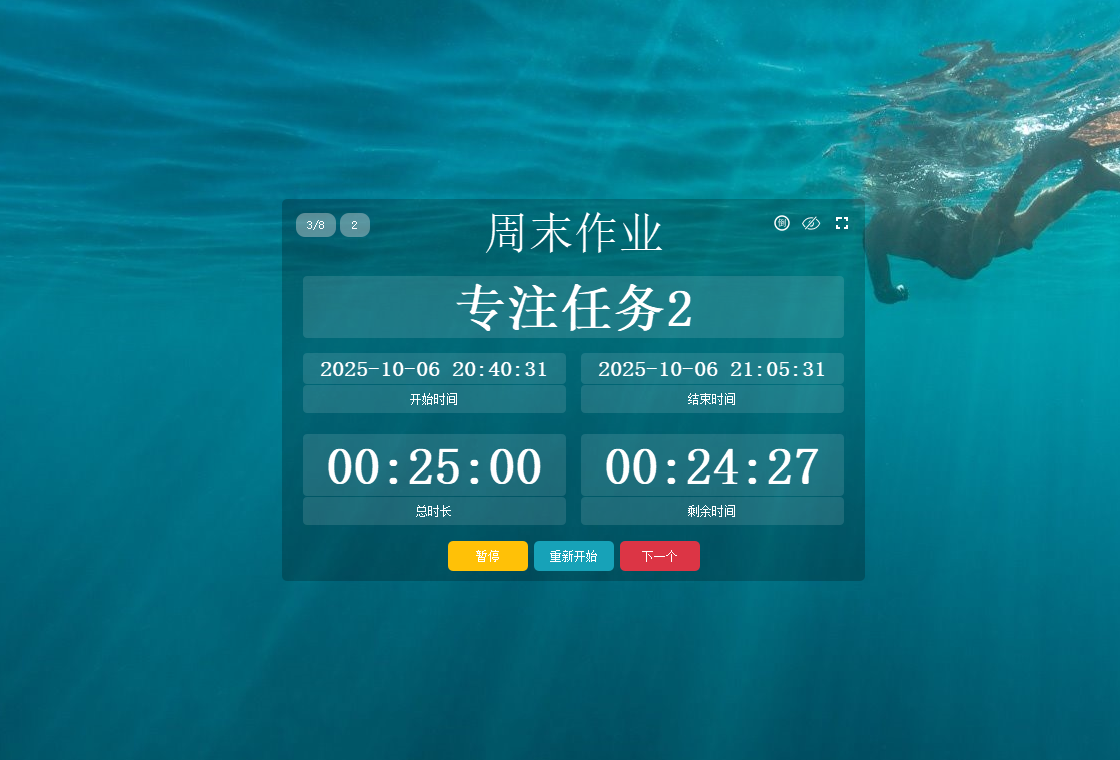
The Pomodoro Technique splits deep work into 25-minute focus blocks followed by 5-minute breaks. After four blocks, you take a longer 15–30 minute recharge.
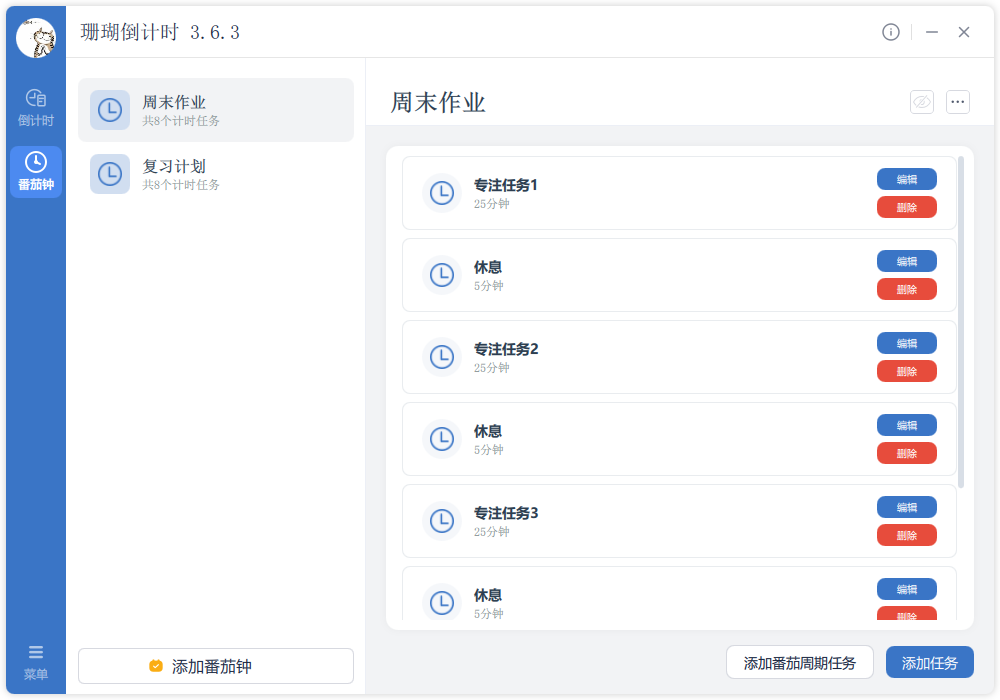
TickPace builds on this method with a dedicated Pomodoro mode so you can stay in flow whether you're studying, coding, designing, or handling daily tasks.
2. Key Highlights
- Classic cadence: default 25 minutes on, 5 minutes off.
- Auto loops: run multiple Pomodoro cycles hands-free.
- Break cues: clear reminders to recover between sessions.
- Custom lengths: tailor both focus and break times.
- Pause & resume: handle interruptions gracefully.
- Sound cues: optional chimes to mark transitions.
- Popups: visual alerts so you never miss a switch.
- Stats: track completed Pomodoro counts and momentum.
3. Use Cases
3.1 Study Flows
📚 Exam prep
Pomodoro blocks keep revision focused and prevent burnout. Cycle through 25-minute sprints with 5-minute breaks to maintain recall.
- Entrance exams: plan revision blocks strategically.
- Graduate exams: structure marathon study sessions.
- Certification prep: follow a consistent cadence.
📖 Reading & research
Use Pomodoro timers to stay immersed in textbooks, papers, or reference material without drifting.
- Academic papers: digest complex concepts in sprints.
- Textbook study: reinforce new knowledge steadily.
- Skill building: practice coding, design, or languages.
✍️ Assignments
Break essays or projects into dedicated focus bursts to fight procrastination.
- Essay writing: dedicate undisturbed blocks.
- Course projects: phase large deliverables.
- Research work: pace progress ahead of deadlines.
3.2 Workday & Tasks
💼 Project sprints
Use Pomodoro blocks to stay in deep work and reduce context switching.
- Software builds: write higher-quality code.
- Documentation: craft reports and proposals.
- Data analysis: focus on insights without distraction.
- Creative work: design, ideate, and storyboard.
📋 Admin blocks
Batch routine tasks to stay efficient.
- Email sweeps: clear inboxes without constant pings.
- Meeting prep: organize decks and agendas.
- Client follow-ups: process requests in batches.
- File cleanup: archive docs and organize assets.
🎯 Long-term goals
Pomodoro sessions create consistent momentum for months-long plans.
- Skill building: languages, tools, certifications.
- Fitness routines: schedule training blocks.
- Career planning: carve out time for growth tasks.
3.3 Lifestyle & Special Routines
🎨 Creative flow
Protect creative energy by alternating focus and recharge.
- Writing: books, blogs, scripts.
- Visual art: illustration, design, motion.
- Music practice: rehearsal and composition.
🏠 Home life
Bring structure to household tasks and family time.
- Housework: clean and organize intentionally.
- Family time: focus fully on kids or partners.
- Shared learning: study together without distractions.
🏥 Wellness
The built-in breaks encourage healthy rhythms.
- Eye rest: step away from screens intentionally.
- Movement reminders: stretch and hydrate.
- Sleep hygiene: keep routines consistent.
👥 Team rituals
Sync team focus by running Pomodoro cycles together.
- Meetings: cap agenda items within Pomodoro slots.
- Collaboration: align work/rest cadence.
- Shift work: rotate duties with shared timers.
4. How to Use
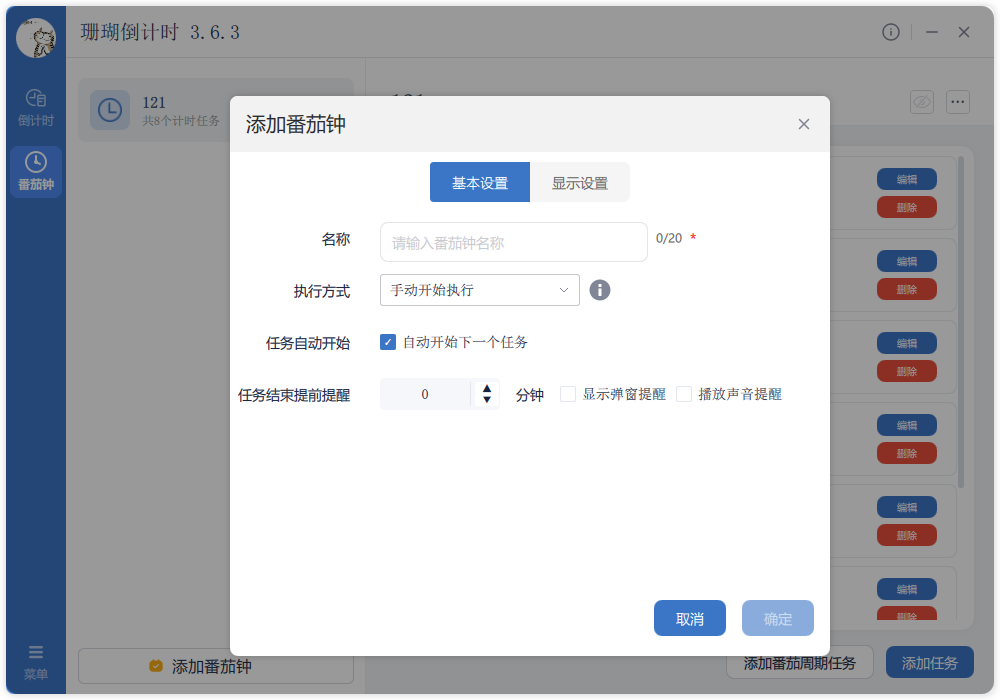
4.1 Create a Pomodoro timer
-
Select “Add Countdown”
Choose the Pomodoro option inside the add dialog.
-
Name your timer
Label it for the context—study, work, writing, etc.
-
Pick a start method
Choose how the cycle should begin:
- Manual: you decide when to start.
- Recurring: run on daily, weekly, or monthly schedules.
- Fixed time: launch automatically at a set timestamp.
-
Auto-start next cycle
Choose whether the next Pomodoro should begin automatically.
-
Configure reminders
Set an early warning (1–2 minutes) to prep for transitions.
-
Choose alert style
Enable popups and/or sounds to avoid missing cues.
-
Save
Confirm to apply the Pomodoro configuration.
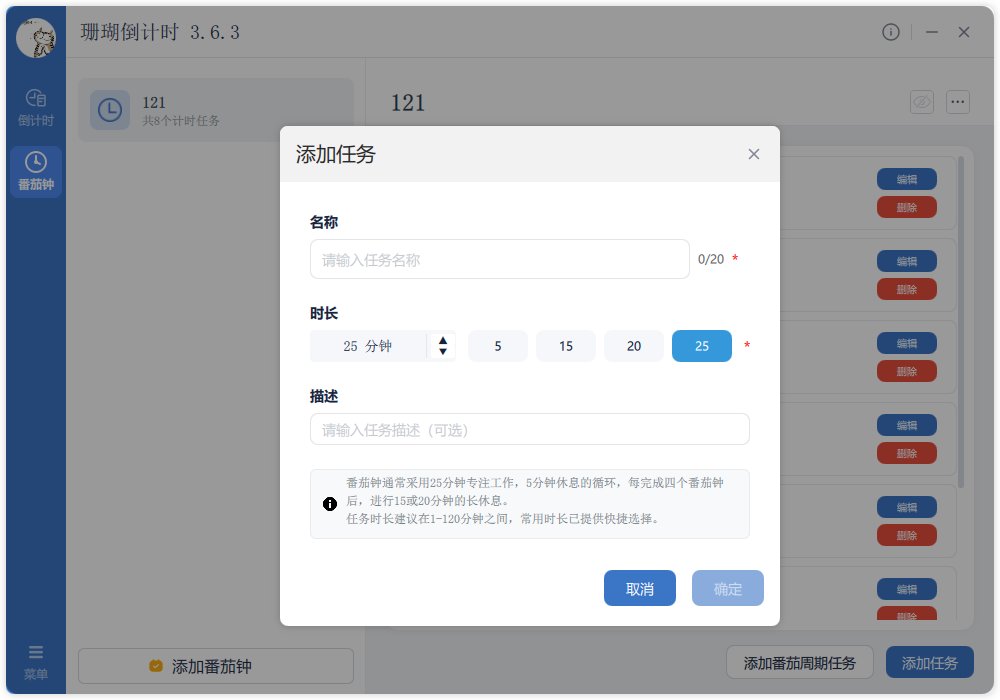
4.2 Create Pomodoro tasks
-
Add a task
Use the “Add Task” button under the Pomodoro timer.
-
Name the task
Describe what you’ll focus on during this block.
-
Set duration
Choose from presets (5/15/20/25 minutes) or enter a custom value.
-
Add details
Optionally include notes or context for later review.
4.3 Run a Pomodoro cycle
-
Focus block
Work deeply for 25 minutes—silence notifications if possible.
-
Pause / resume
For urgent interruptions, pause the timer and resume when ready.
-
Short break
Take 5 minutes to reset—stretch, hydrate, look away from screens.
-
Next round
Start the next 25-minute block when the break ends.
-
Long break
After four cycles (~2 hours), recharge for 15–30 minutes.
5. Tips & Notes
💡 Adjust the length
If 25 minutes doesn’t fit, tweak the block:
- Beginner: stay with 25 minutes while you adapt.
- High focus: extend to 30–45 minutes.
- Low focus: shorten to 15–20 minutes.
💡 Plan breaks intentionally
Breaks matter just as much:
- Short break (5 min): stretch, hydrate, rest your eyes.
- Long break (15–30 min): eat, walk, light exercise.
- Avoid doom-scrolling that disrupts your rhythm.
💡 Guard your focus
During each block:
- Silence or disable notifications.
- Close unrelated tabs/apps.
- Log interruptions for later instead of context switching.
- Create a quiet, clutter-free environment.
💡 Track and review
Reflection keeps you improving:
- Log the number of Pomodoros per day.
- Note which tasks you completed.
- Identify your ideal block/break ratio.
- Watch productivity trends over time.
⚠️ Reminders
- Watch your energy—don’t chain Pomodoros endlessly.
- Rest immediately if you feel drained.
- The timer is a tool; habits drive real change.
- Customize durations; 25 minutes isn’t mandatory.
- Use shorter blocks late at night to protect sleep.